


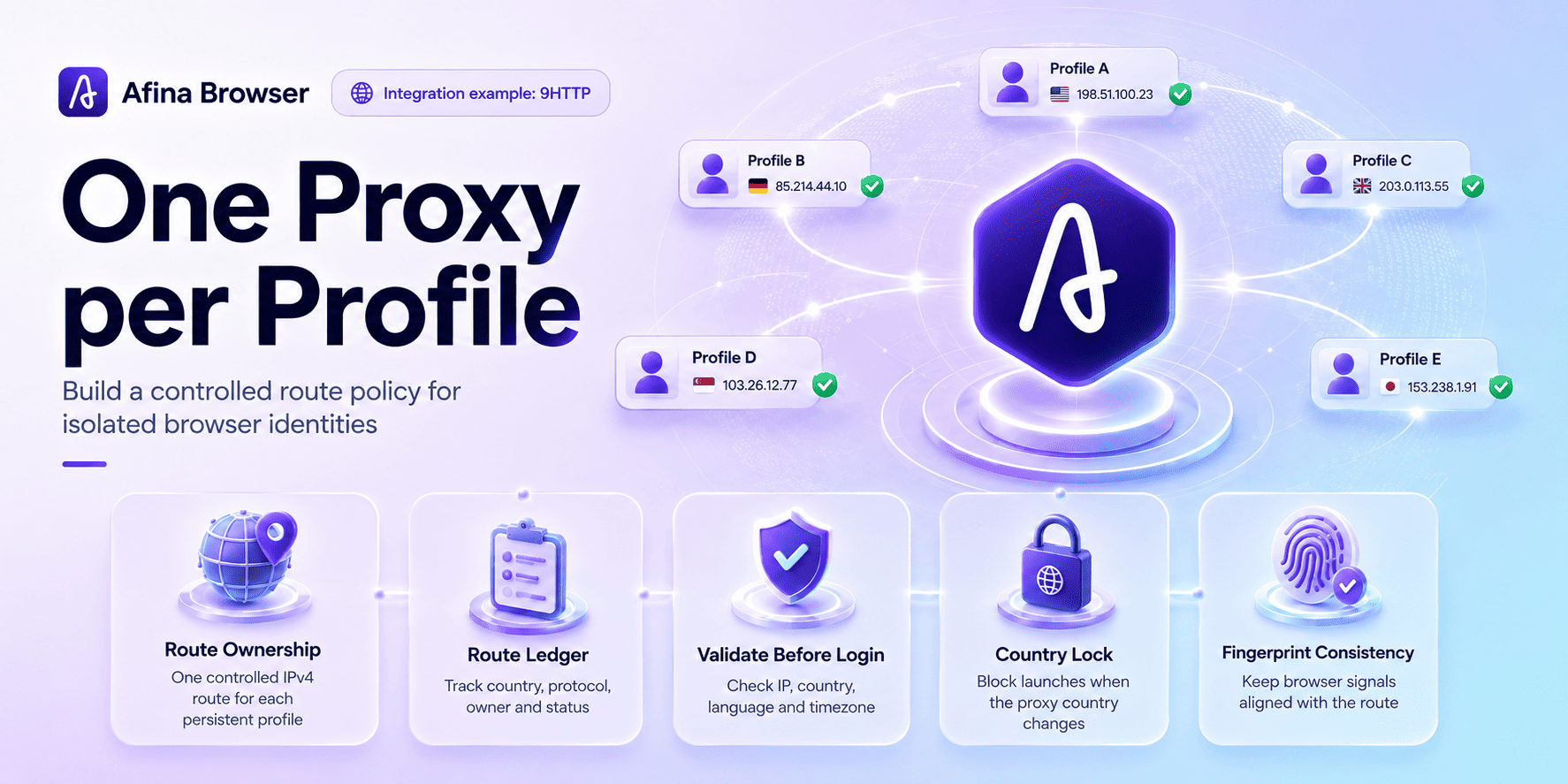


A one-proxy-per-profile policy means assigning one controlled IPv4 route to one persistent browser identity. Teams use it to keep account sessions separated and make route changes traceable. In real operations, the policy works only when endpoint rotation, fingerprint settings, cookies, and operator handoffs follow the same rules.
The common failure is not a missing proxy field. It is a missing operating policy. One person replaces an endpoint, another launches the same profile from a different location, and a third cannot explain why the account changed country during an active session. When route ownership is unclear, Afina's proxy manager gives the team one place to assign, check, and review proxy connections before a profile starts.
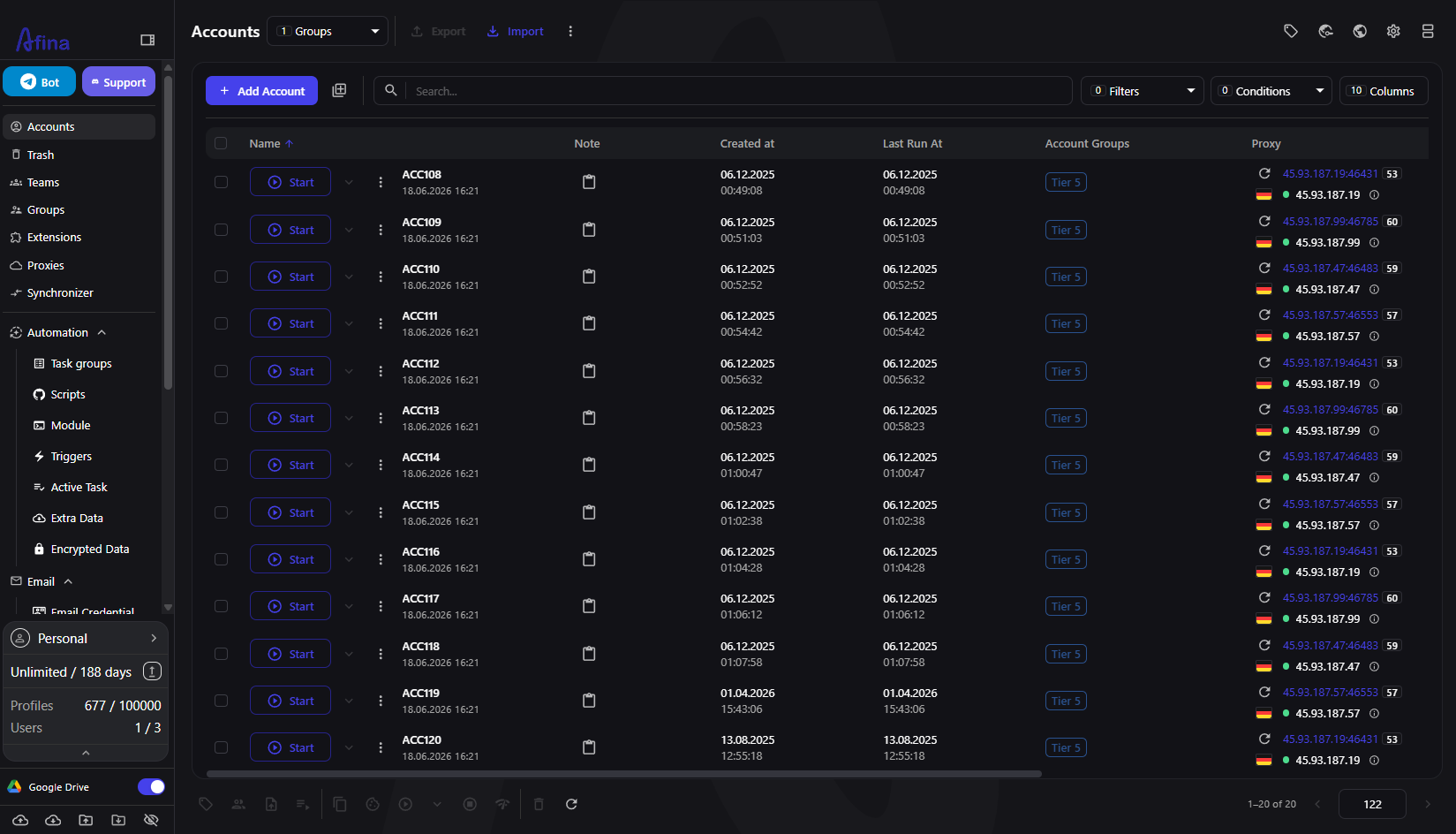
This guide uses 9HTTP and Afina as an integration example. 9HTTP provides residential and ISP proxy options with HTTP, HTTPS, and SOCKS5 endpoints. Afina handles the browser side: isolated profiles, route assignment, IP-aligned settings, and operational controls. The useful result is not merely a successful connection. It is a repeatable record of which route belongs to which profile and when that relationship may change.
What the policy controls
The policy starts with a simple rule: a persistent account keeps the same browser profile and the same route strategy. A "route strategy" may mean a stable endpoint, a sticky session, or a documented rotation rule. It does not necessarily mean that one IP can never change. It means changes happen deliberately, with a reason and a record.
That distinction matters in a multi-accounting workspace. Browser storage may be isolated correctly while the network layer still creates avoidable overlap. Two profiles can share an exit IP, one profile can jump between countries, or a new proxy can disagree with the profile's language and timezone. Each inconsistency makes troubleshooting harder because several signals changed at once.
The operating policy should answer five questions:
- who owns the profile;
- which provider product and protocol it uses;
- whether the route is stable, sticky, or rotating;
- what event permits an endpoint change;
- who verifies the new route before login
Once those answers are recorded, an operator can diagnose a bad session without guessing which colleague changed what.
Build a route ledger before creating profiles
A route ledger is a small control table, not a password vault. It stores the details needed to identify a connection without exposing credentials to everyone. For each profile, record an internal profile ID, purpose, proxy label, protocol, expected country, session policy, owner, last validation time, and status.
In Afina, tags and groups can mirror the same structure. A team might group profiles by project and use tags for country, owner, or lifecycle stage. The ledger remains the change record; Afina remains the execution workspace.
Avoid putting raw proxy passwords in shared notes. Keep credentials in the controlled system where they are needed and use a neutral proxy label in the ledger. A label such as DE-ISP-017 is enough to investigate ownership, while the actual host, port, login, and password remain restricted.
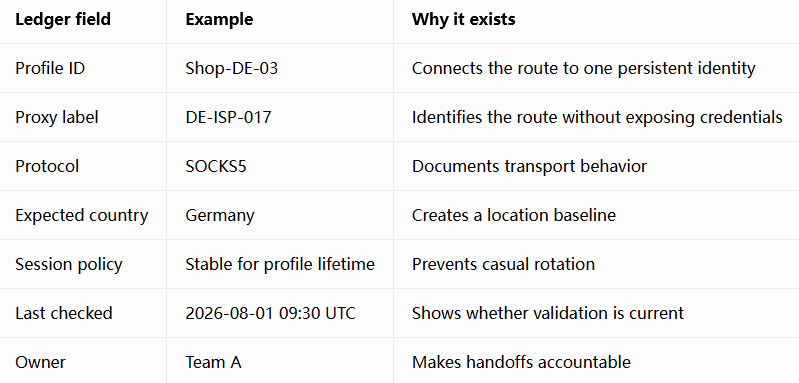
The table is intentionally boring. That is a strength. A compact record survives staff changes and makes a bulk review possible.
Configure and validate one controlled route
Start with one profile, even if the final rollout includes dozens. In Afina, open Accounts, use the three-dot menu for the selected account, choose Edit, and open the Proxy tab. Select Set Proxy, choose the protocol, and enter the IPv4 host, port, login, and password. Afina supports HTTP, HTTPS, and SOCKS5; IPv6 is not supported.
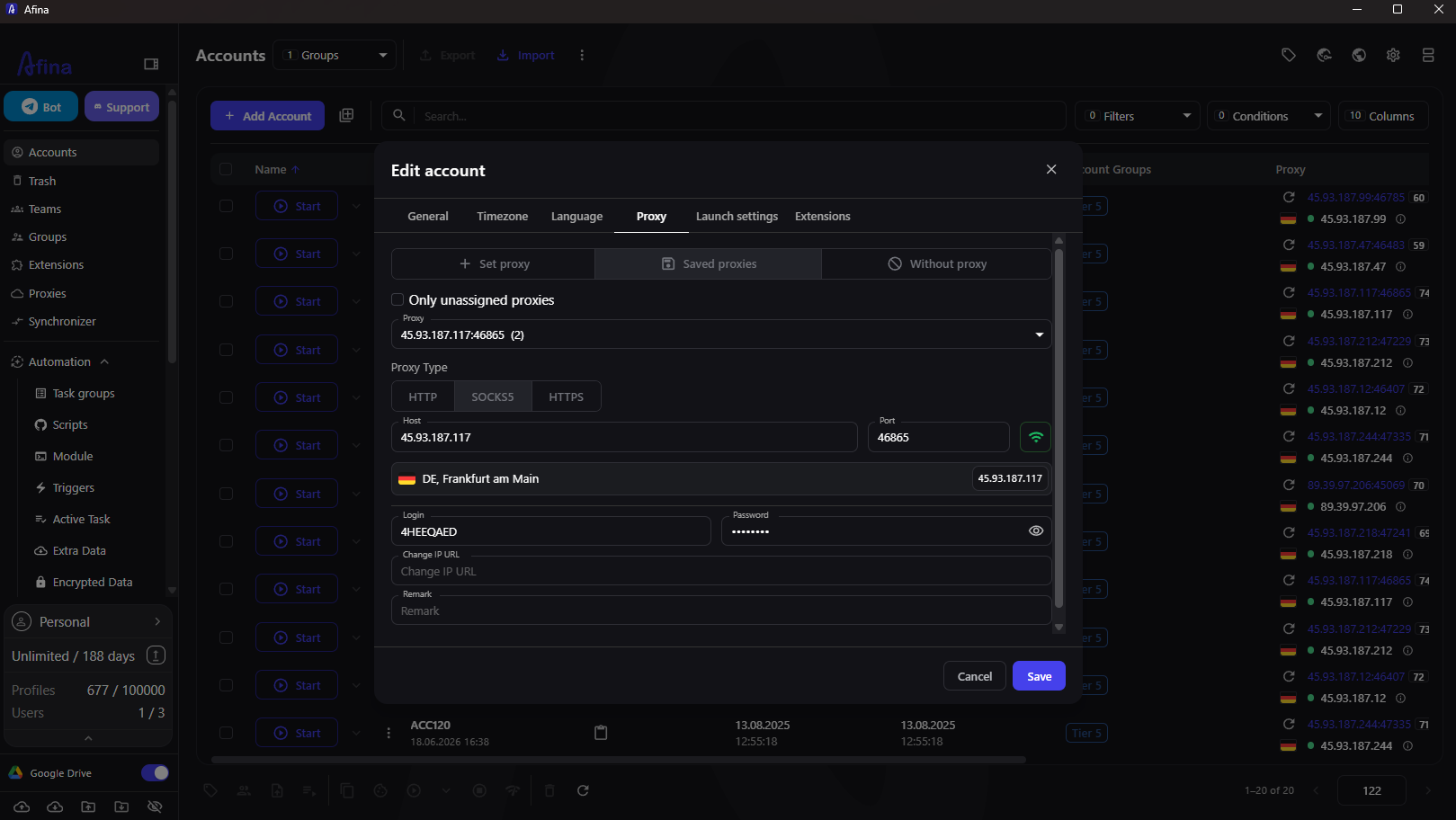
Use the built-in connection check before saving. A successful check proves that Afina can reach the endpoint with the supplied credentials. It does not prove that the route matches the intended country, session duration, or application behavior, so validation continues after launch.
For a 9HTTP route, copy the endpoint details from the appropriate residential or ISP product into this form. Choose the protocol according to the workflow. HTTP or HTTPS may be enough for ordinary TCP browsing. SOCKS5 is required if the workflow depends on UDP transport, but the endpoint itself must genuinely support UDP. The label alone is not evidence.
Before signing in to an account:
- confirm the visible country and IP against the ledger;
- check that timezone and browser language follow the IP;
- verify WebRTC behavior when the workflow uses it;
- close the profile and investigate if any baseline signal is wrong
This gate prevents a weak route from becoming a session-history problem.
Decide when an endpoint may change
Stable identity does not mean permanent infrastructure. Proxies expire, credentials rotate, and business tasks move. The policy should separate planned changes from emergency changes.
A planned change happens between sessions. The operator stops the profile, records the reason, assigns and checks the new route, updates country-aligned settings, launches without logging in, and repeats the acceptance test. Only then does the profile return to active use.
An emergency change begins with containment. If a proxy fails during a session, stop the profile rather than cycling through endpoints while the account remains open. Preserve the last known IP and time in the incident record. Then replace and validate the route offline.
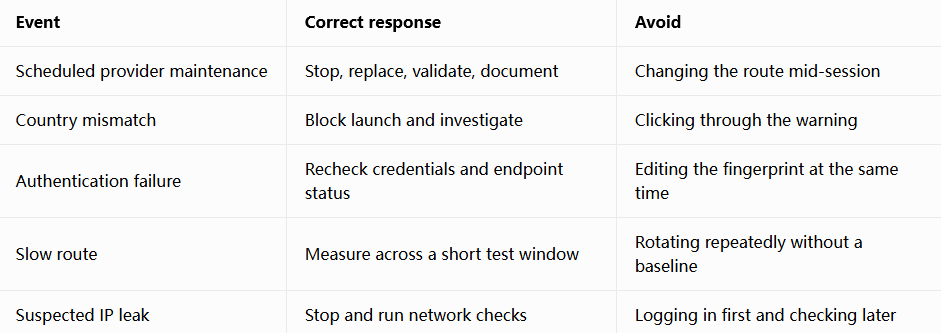
Afina includes a Block on proxy country change control. Setting it to Always block turns a location mismatch into a stopped launch instead of a silent identity change. The control is useful precisely because it makes the policy enforceable.
Scale without losing ownership
Bulk operations save time only after one route passes the acceptance test. Afina can assign saved proxies to multiple selected accounts and filter for unused proxies. That helps a team avoid accidental reuse, but the operator still needs to map each assignment back to the route ledger.
For large batches, split the rollout into small waves. Check the first few profiles, compare their visible IP, country, language, timezone, and WebRTC results, then continue. If the first wave fails, the team fixes one pattern instead of reopening an entire fleet.
Network consistency is only one layer. A route may be correct while browser signals are poorly configured. Use Afina fingerprint management to keep the operating system, screen, Canvas, WebGL, Audio, Rects, language, and timezone policy controlled. Do not regenerate every value simply because one connection failed. Change the failing layer, test again, and keep the rest of the baseline stable.
Operator handoffs need the same discipline. The outgoing owner should stop the profile, update the ledger, and confirm the current route. The incoming owner should validate before the first login. Shared credentials in chat are not a handoff process.
Risks and limits the workflow cannot remove
A one-proxy-per-profile policy reduces ambiguity; it does not guarantee account safety. Platforms evaluate behavior, account history, device signals, cookies, network quality, and policy compliance. A clean route cannot compensate for expired cookies, unrealistic fingerprint choices, or prohibited activity.
The browser also cannot add capabilities that the proxy endpoint lacks. SOCKS5 in Afina can carry UDP when the proxy provides real UDP tunneling. If the upstream route does not support it, affected traffic falls back or fails. Test the actual endpoint rather than relying on a product label.
Finally, do not confuse isolation with invisibility. The goal is a consistent and auditable working environment. Keep profiles tied to legitimate business purposes, follow platform rules, minimize unnecessary changes, and investigate anomalies before continuing.
Teams that follow this process gain something practical: when a session fails, they know whether to inspect the endpoint, the profile configuration, or the operating procedure. That is far more useful than replacing every component at once.
Promo codes for new users:
- SALE20 - 20% off all plans except Max
- SALE30 - 30% off the Max plan
FAQ
Should every Afina profile use a different proxy?
Persistent profiles should normally have distinct, documented routes when the workflow requires account separation. The exact policy depends on the platform, account type, and legitimate business task.
Can I use a rotating residential endpoint with a persistent profile?
Yes, but rotation must be predictable. Use a sticky session or a documented change rule, and avoid country changes during an active account session.
Does a successful proxy check prove that the setup is safe to use?
No. It proves that Afina can connect with the supplied credentials. You still need to confirm the visible IP, country, timezone, language, and relevant WebRTC behavior before login.
What should I change first when a profile stops working?
Change nothing at first. Stop the profile, compare current signals with the ledger, identify the failing layer, and adjust only that layer before repeating the acceptance test.