


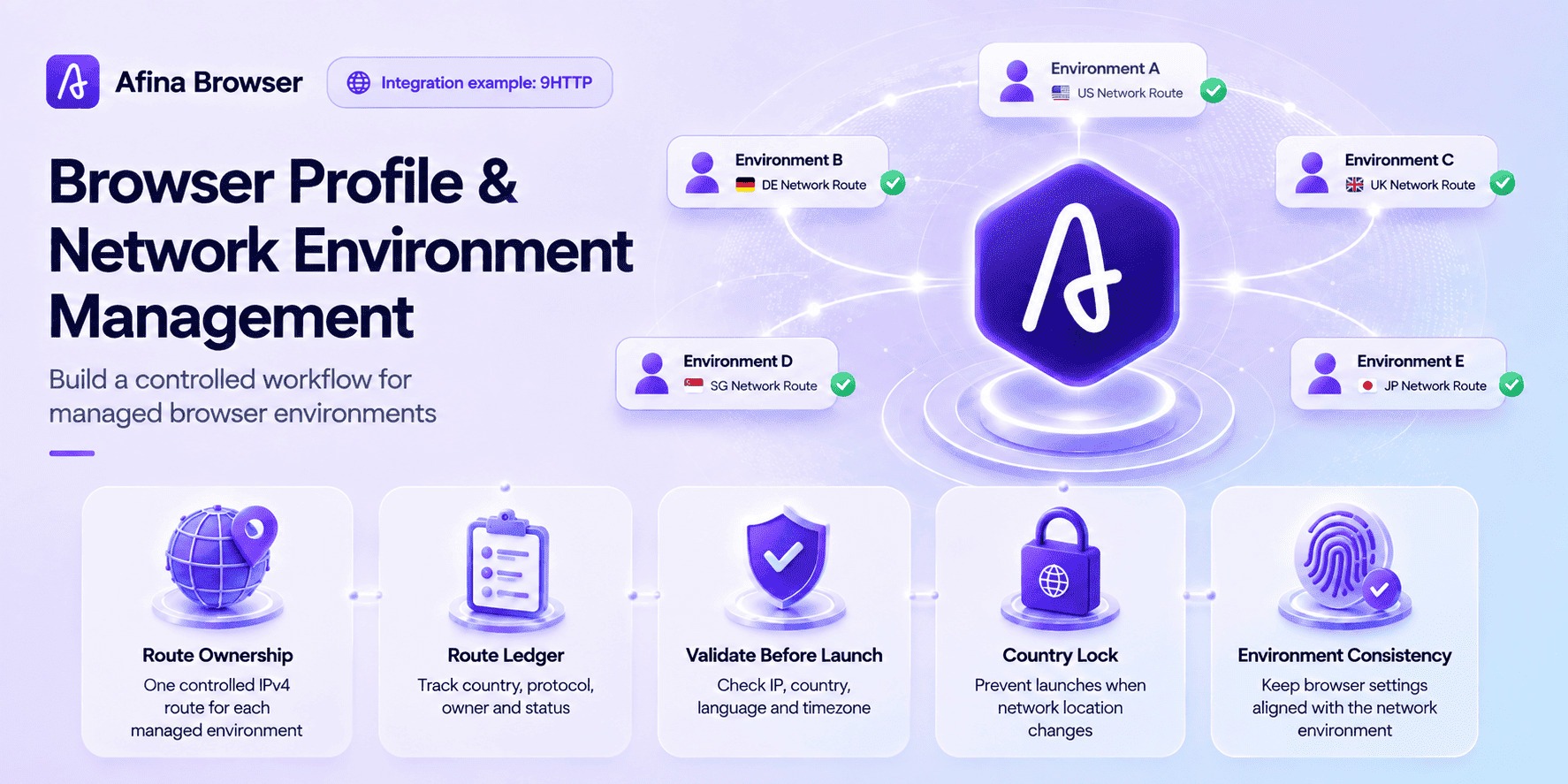



A browser and network environment management workflow refers to associating a controlled IPv4 network route with a designated browser configuration environment. Teams use this approach to maintain consistency across different business environments, track network changes, and simplify testing, maintenance, and troubleshooting. In practical scenarios, this workflow becomes effective only when network endpoints, browser environment settings, session data, and team handover procedures follow a consistent management process.
Many common issues are not caused by missing a proxy field during setup. Instead, they usually come from the lack of standardized operational procedures. One team member changes an endpoint, another starts the same configuration from a different region, and a third person cannot determine why the business environment shows a different network location. When network ownership and configuration records are unclear, the Afina Proxy Manager helps teams assign, verify, and review proxy settings before launching a browser configuration.
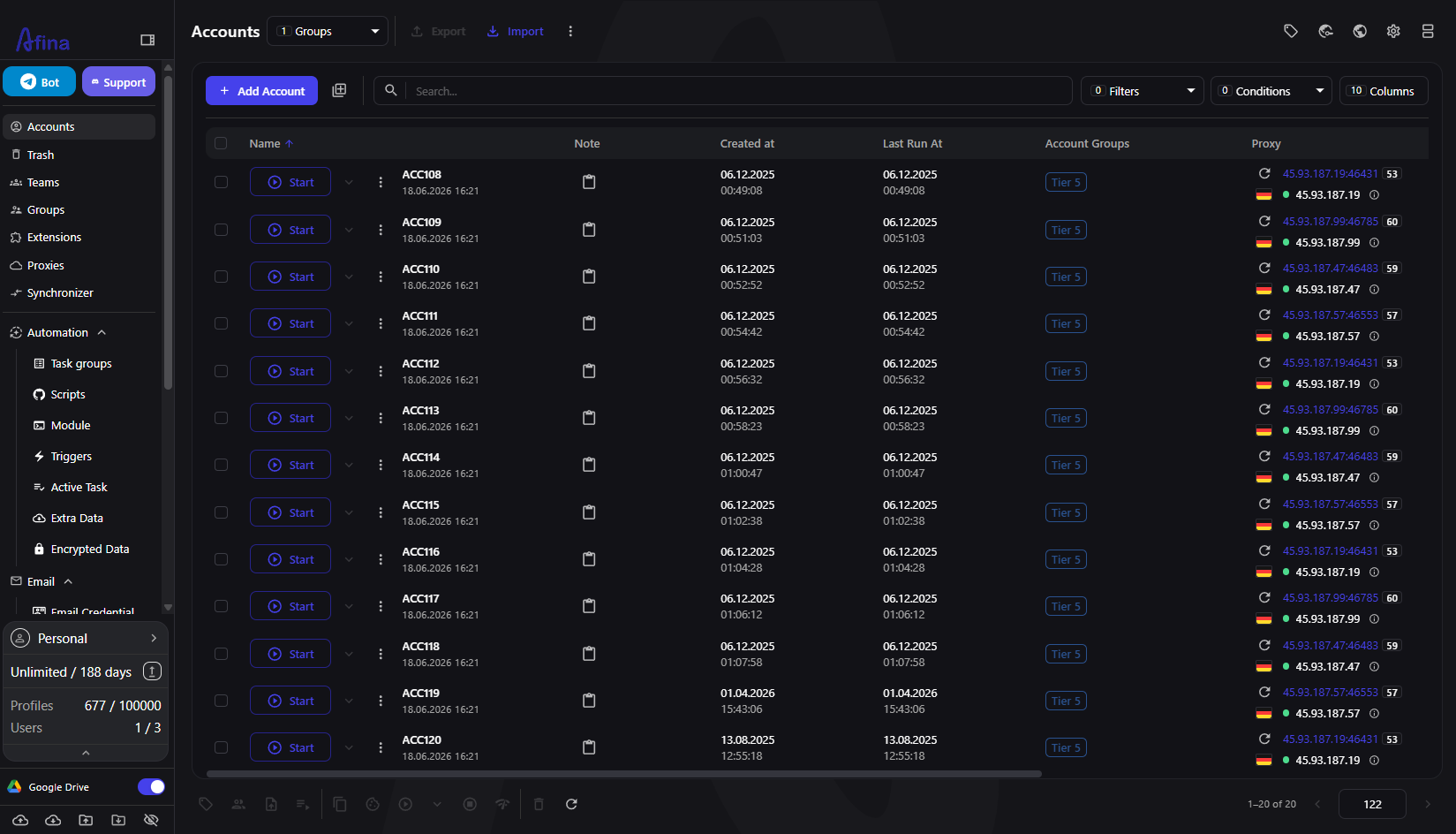
This article uses the integration between 9HTTP and Afina as an example. 9HTTP provides residential proxy and ISP proxy options with support for HTTP, HTTPS, and SOCKS5 endpoints. Afina manages browser profiles, network assignment, environment settings, and team collaboration workflows. The real value is not simply achieving a successful connection, but allowing teams to clearly understand which network route belongs to which configuration and when changes are approved.
What Does a Network Environment Management Workflow Control?
The workflow starts with a simple principle: long-running business environments should maintain stable browser configurations and clearly defined network rules. A network strategy can include fixed endpoints, sticky sessions, or documented rotation procedures. It does not mean that an IP address can never change; instead, every change should have a clear reason and a proper record.
This approach is especially important in multi-project and multi-environment collaboration scenarios. Browser configurations may already be organized separately, but network environments can still become inconsistent. For example, different business environments may share the same network route, or the network region may not match the browser language and timezone settings. Changing multiple environment signals at the same time can make troubleshooting more difficult.
A standardized workflow should answer five key questions:
- Who is responsible for each configuration?
- Which proxy product and protocol are being used?
- Is the network route fixed, sticky, or rotated?
- Under what circumstances can an endpoint be changed?
- Who verifies the new network connection before use?
Once these details are documented, teams can identify the source of connection issues without guessing what was changed or by whom.
Build a Network Record Before Creating Configurations
A network record is a simple management document, not a password storage system. It stores only the information needed to identify connections while keeping credentials restricted. Each configuration should include an internal ID, purpose, proxy label, protocol, expected country, session strategy, responsible person, last verification time, and current status.
Afina tags and groups can map to the same structure. Teams can organize configurations by project and use labels to identify countries, owners, or lifecycle stages. The record tracks changes, while Afina executes the operational workflow.
Avoid storing raw proxy credentials in shared notes. Credentials should remain inside controlled systems where they are required. The record should only use neutral identifiers. For example, DE-ISP-017 is enough to track a network route, while the host, port, username, and password remain protected.
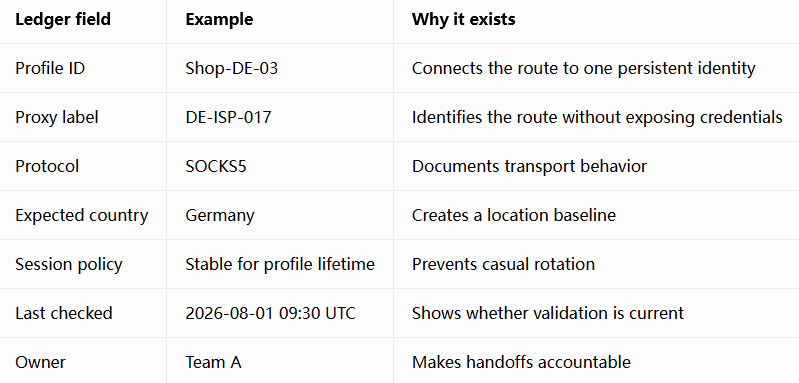
Keeping the record simple makes it easier to maintain during team changes and allows faster reviews across multiple configurations.
Configure and Verify a Controlled Network Route
Even when dozens of configurations will eventually be deployed, teams should begin by validating one configuration first. In Afina, open Accounts, click the three-dot menu next to the target account, select Edit, and open the Proxy tab. Choose Set Proxy, select the required protocol, and enter the IPv4 host, port, username, and password. Afina supports HTTP, HTTPS, and SOCKS5, but does not support IPv6.
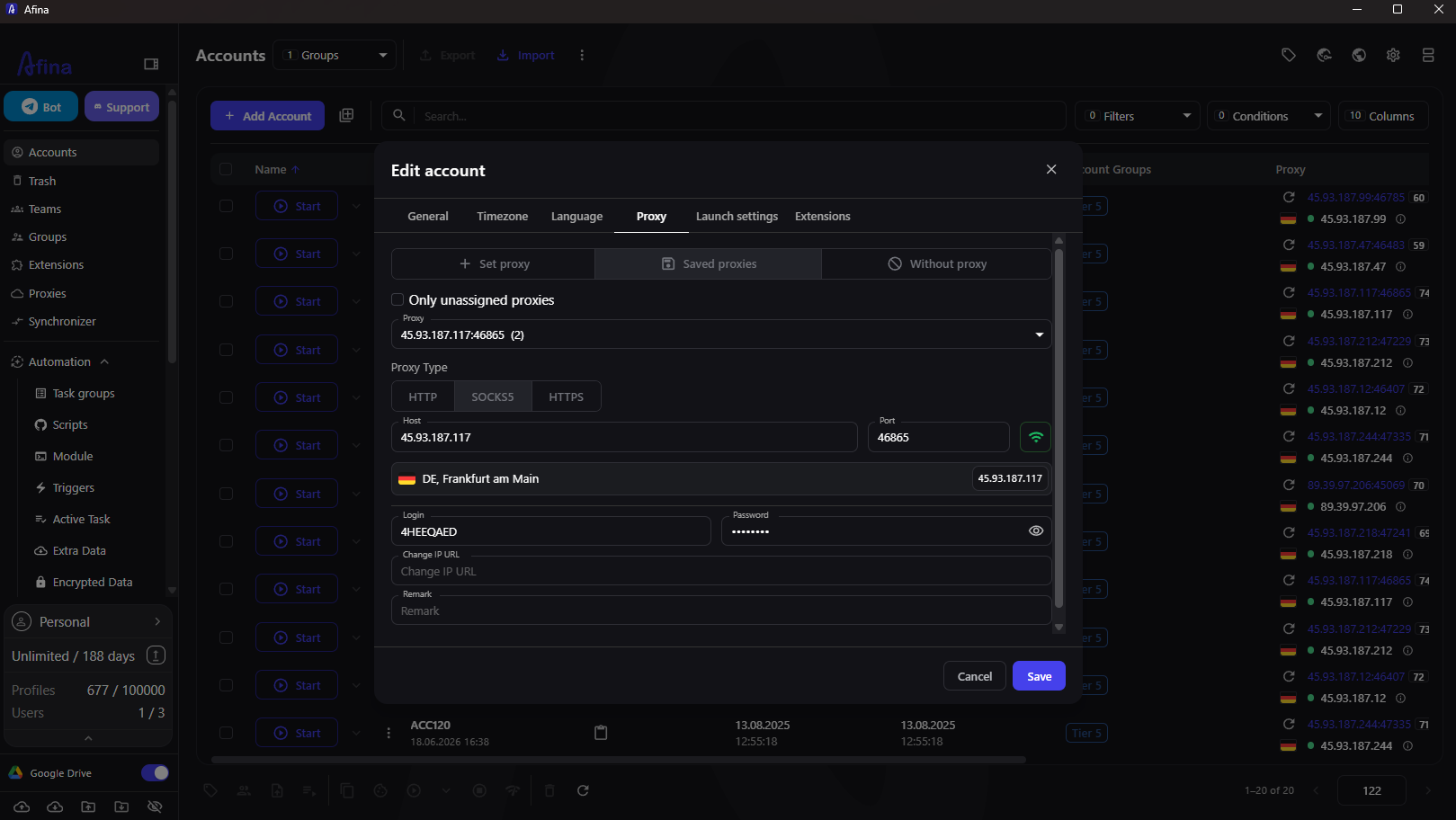
Before saving the configuration, run the built-in connection check. A successful check only confirms that Afina can connect to the provided endpoint using the supplied credentials. It does not confirm that the network route matches the required country, session duration, or application requirements. Additional verification should be completed after the configuration starts.
When using 9HTTP endpoints, teams can enter the corresponding residential proxy or ISP proxy details into this form. The protocol should be selected according to the workflow requirements. For standard TCP browsing tasks, HTTP or HTTPS is usually sufficient. If a workflow requires UDP traffic, SOCKS5 may be needed, but the endpoint itself must actually support UDP. A SOCKS5 label alone does not guarantee UDP capability.
Before starting a business environment:
- Confirm the visible IP address and country based on the network record;
- Check whether timezone and browser language match the intended environment;
- If the workflow involves WebRTC, verify the related network behavior;
- If any baseline setting is incorrect, stop the configuration and investigate.
These checks help teams identify network configuration issues before they affect ongoing workflows.
Define When Endpoint Changes Are Allowed
A stable browser configuration does not mean the underlying infrastructure will never change. Proxies can become unavailable, credentials may need rotation, and business requirements can evolve. A proper workflow should distinguish between planned changes and emergency changes.
Planned changes should happen between two business runs. The operator should first stop the current configuration, record the reason for the change, assign and verify the new network route, update region-related settings, and then restart the configuration environment for another verification process. The environment should only continue after all checks are completed.
For emergency changes, isolation should come first. If a proxy fails during operation, pause the current configuration environment instead of continuously switching between multiple endpoints. Record the last known IP address and timestamp, then replace and verify the network route offline before resuming.
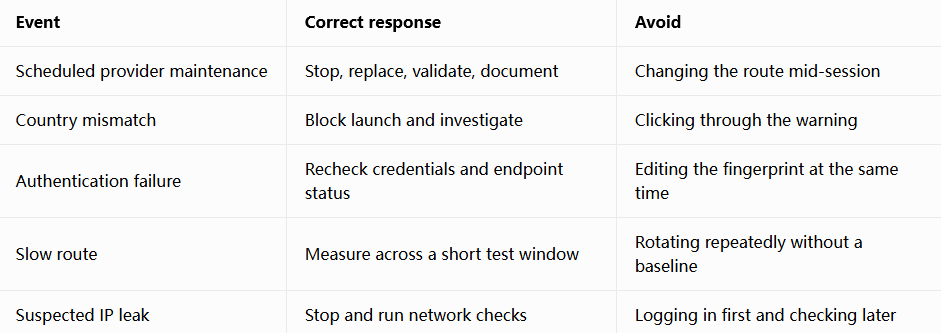
Afina provides the Block on proxy country change control option. Setting it to Always block prevents startup when the configured location does not match, rather than silently changing network environment parameters. This turns a written workflow rule into an enforceable control.
Scale Operations Without Losing Network Ownership
Once a single network route has passed verification, batch management becomes more efficient. Afina allows teams to assign saved proxies to multiple selected browser configurations and filter unused proxies to reduce configuration mistakes. However, every assignment should still be recorded in the network management log.
For larger deployments, teams should work in smaller batches. Verify a limited number of configurations first, compare their visible IP, country, language, timezone, and network behavior, then continue with the next batch. If the first group encounters issues, teams only need to correct one pattern instead of reviewing the entire configuration set.
Network consistency is only one layer of the overall environment. A correct network route does not automatically guarantee a properly configured browser environment. Afina browser environment management helps teams maintain consistent device parameters, language settings, timezone settings, and other browsing environment elements to reduce differences between testing environments.
Avoid regenerating every setting because of a single connection issue. Identify the specific layer causing the problem, adjust only that part, and keep other baseline settings unchanged.
Team handovers require the same level of discipline. The previous owner should stop the configuration, update the management record, and confirm the current network route. The new owner should complete verification before using the environment. Sharing credentials through chat messages should not be considered a complete handover process.
Limitations of Browser and Network Environment Management
A browser and network environment workflow can reduce configuration uncertainty, but it cannot guarantee business stability. Platforms may evaluate factors such as user behavior, account history, device environment, cookies, network quality, and compliance with platform rules. A stable network route cannot replace proper browser configuration, effective data management, or compliant operations.
A browser tool also cannot add capabilities that the proxy endpoint itself does not provide. When a proxy service provides real UDP tunneling, SOCKS5 in Afina can support UDP traffic. If the upstream network does not support it, related traffic may fail or fall back. Teams should test actual endpoint capabilities instead of relying only on product labels.
Finally, environment management should not be viewed as simple network switching. The goal is to create a consistent and auditable workflow. Browser environments should support clear business requirements, follow platform policies, and maintain transparent operational procedures.
By following this workflow, teams gain a practical advantage: when a connection issue occurs, they can determine whether the problem comes from the endpoint, configuration settings, or operational process. This is more effective than replacing all components at once.
Download Afina Browser
New user discount codes:
- SALE20 - 20% discount on all plans except Max
- SALE30 - 30% discount on Max plan
FAQ
Does every Afina configuration require an independent network environment?
Not necessarily. Whether an independent network environment is needed depends on business requirements, such as regional testing, market research, or different project environments.
Can long-running browser environments use rotating residential proxies?
Yes, but rotation should follow predictable rules. Use sticky sessions or documented change procedures, and avoid frequent network region changes during business operations.
Does a successful proxy connection test mean the configuration is ready?
No. It only confirms that Afina can establish a connection using the provided credentials. Before use, teams should still verify the visible IP, country, timezone, language, and related network communication behavior.
What should be changed first when a configuration stops working?
Avoid changing multiple settings immediately. First stop the current configuration environment, compare the actual state with the network record, identify the problematic layer, adjust only that part, and repeat the verification process.