9HTTP



 4 min read


When configuring a proxy, your application will usually ask for a server address and port. These details may be available in your provider’s dashboard, included in a proxy connection string, or saved in your computer or browser settings.
Start by deciding whether you need connection details for a newly purchased proxy or want to inspect an existing configuration on your own device or an authorized network. This guide explains where to look, how to identify each field, and how to check your connection.
Where Should You Look for Your Proxy Address and Port?
For a newly purchased proxy, check your provider’s dashboard first. Purchasing a service does not normally add its settings to your device automatically. An empty system proxy settings page does not necessarily mean your service is inactive. Open the configuration or extraction page for the product you purchased to obtain its connection details.
For a proxy you already use, check the application using it. Browser extensions, standalone applications, and operating system settings can each store proxy configurations. One application may use a proxy while other software connects directly to the internet.
For an organization-managed network, contact your administrator. Your workplace or school may distribute proxy settings through policies or automatic configuration scripts. If settings are locked, only a script URL is visible, or an application requires a fixed address, ask your administrator for the appropriate configuration.
Identify the Address and Port in a Connection String
Your provider may display proxy details as separate fields or as a complete connection string, such as:
http://demo_user:demo_password@proxy.example.com:8080
Here, http specifies the protocol used to connect to the proxy, demo_user and demo_password are example credentials, proxy.example.com is the server address, and 8080 is the port. This example explains the format and is not a working proxy.
If your application has separate input fields, enter each value in its corresponding field. The server address field usually accepts only a hostname or IP address. Use the complete string only when the application specifically requests a proxy URL or connection string.
Some proxy lists use formats such as address:port:username:password. Check the export format before importing the details to avoid placing values in the wrong fields. There is no universal port for every proxy service. Use the port supplied for your specific product.
Get Your Proxy Connection Details in 9HTTP
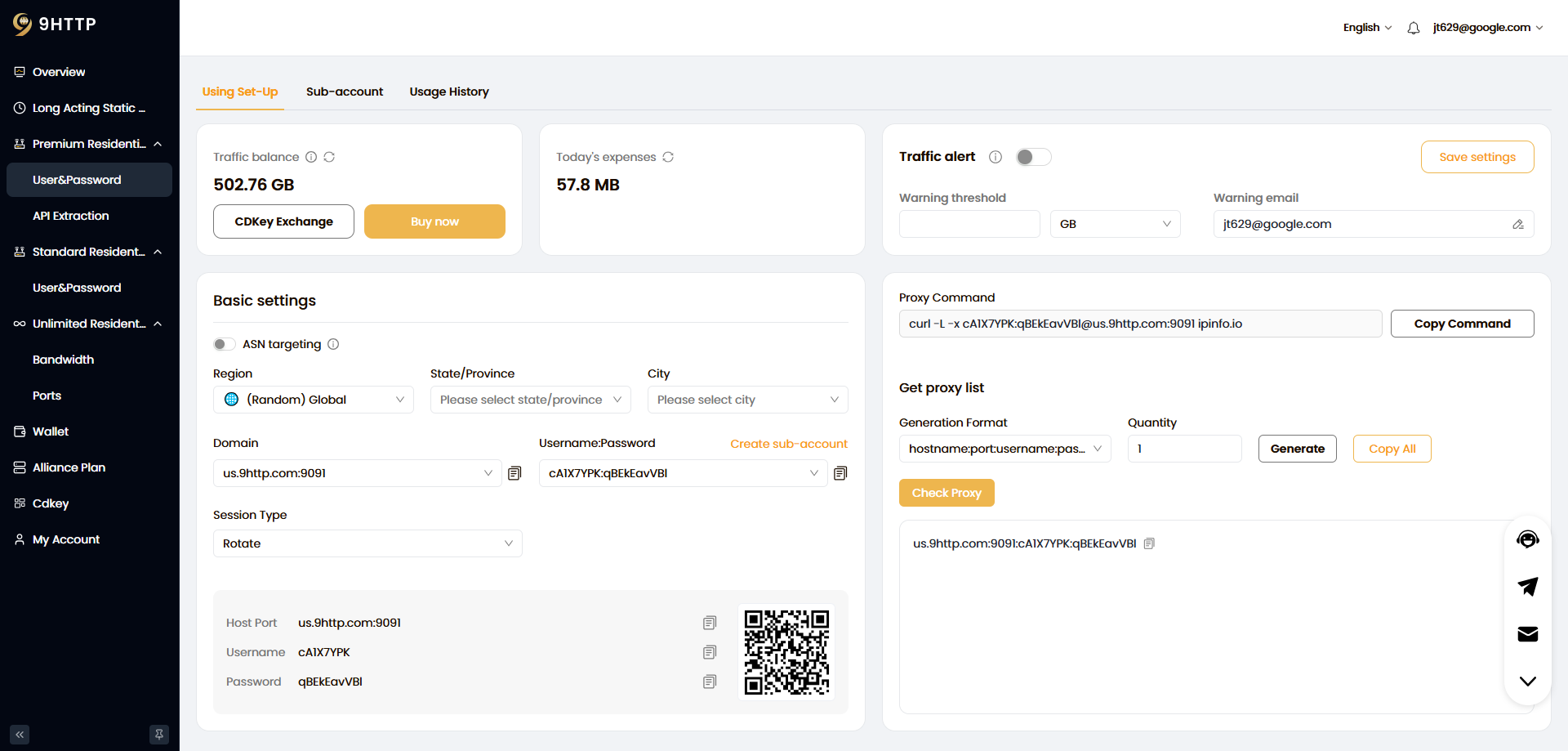
Sign in to the 9HTTP dashboard, open your active product, and confirm its connection and authentication requirements.
For Dynamic Residential Proxies, the current official documentation describes account management under Dynamic Residential Proxies → Username/Password. To assign separate credentials to different projects, you can create an account under Sub-accounts and set a usage limit. Use the proxy credentials provided there rather than assuming your website login password is also your proxy password.
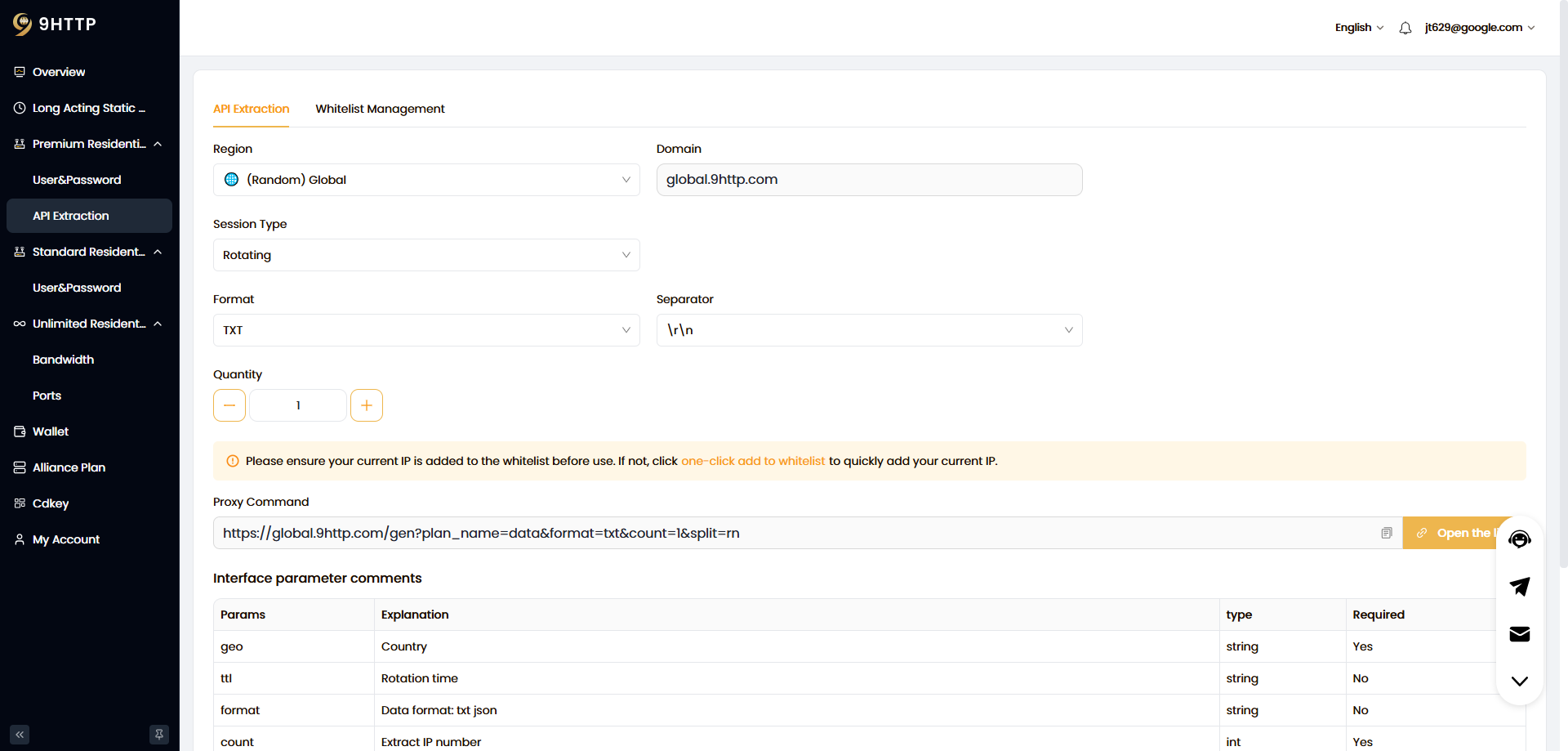
For API extraction, open Dynamic Residential Proxies → API Extraction, configure the whitelist and extraction parameters as required, and generate the results. The extraction URL retrieves a proxy list; it should not be entered as a regular proxy server address. Find the connection details your application needs in the generated results or the relevant product instructions.
Check the protocol, address, port, and authentication method together. Menu labels and features may change, and requirements can differ between products or connection methods. Refer to the current dashboard and product documentation.
Why Does an IP Lookup Show a Different Address?
Your device connects to a proxy through an entry endpoint, while the destination website sees an exit IP address. These serve different purposes, so different addresses do not necessarily indicate a configuration error.
For example, you may connect through a hostname while the website sees a numeric IP address assigned by the service. With rotating proxies, the entry hostname may remain unchanged while the exit IP changes.
Do not replace your provider’s hostname simply because an IP lookup shows a different address. The exit IP may not accept direct client connections, and an IP lookup website generally cannot tell you which proxy port to use.
How Can You Check Whether the Connection Works?
In the application that needs the proxy, access a page you own or are authorized to use for testing. Check whether the request completes, then review the exit IP information or application logs. A successful connection in one browser does not mean other applications are using the same proxy.
If the connection fails, check that the hostname and port are complete, there are no extra spaces, the protocol matches, and the authentication details are correct. For whitelist authentication, also confirm that your current public IP address is authorized.
A 407 Proxy Authentication Required response indicates that you should check the proxy authentication configuration. Timeouts may involve the network, firewall, endpoint, or service availability. A 403 response requires further inspection to identify its source and does not, by itself, prove that your password is incorrect. Keep the error details to support troubleshooting.
Frequently Asked Questions
How to Find Proxy Server Address on Windows 11?
Open Settings → Network & internet → Proxy. Under Manual proxy setup, select Set up or Edit next to Use a proxy server to inspect the saved address and port. You do not need to enable or change the configuration just to view it.
If Use setup script is enabled, you will usually see an automatic configuration script URL. Proxies configured separately in browser extensions or applications must be checked in those tools. The command netsh winhttp show proxy displays WinHTTP settings and does not represent every browser or application configuration.
How to Find Proxy Server Address on Mac?
Open Apple menu → System Settings → Network, select your active network service, and go to Details → Proxies. Inspect the server address and port for the enabled proxy type.
Make sure you select the Wi-Fi or Ethernet connection currently in use. If automatic proxy configuration is enabled, you may see only a script URL. Ask your administrator for any additional connection details you need.
Is a Proxy Server Address the Same as an IP Address?
A proxy server address can be either an IP address or a hostname. The client uses it to locate the proxy service, along with the appropriate port and any required authentication.
The entry address and exit IP are not necessarily the same. An IP lookup page shows the source address seen by that website, which cannot automatically replace the connection endpoint supplied by your provider.
How to Find My Proxy Address?
Start with the application or browser extension using the proxy. If it is configured to use the system proxy, check your operating system’s network settings. Chrome and Edge generally provide a settings link that opens system proxy settings, while Firefox supports a separate configuration under Settings → General → Network Settings.
If the address is 127.0.0.1, the entry endpoint is on your own device. To identify the remote proxy connection, inspect the configuration of the local client providing that endpoint.
How to Find Proxy Port Number?
The port is usually displayed alongside the address in your provider’s dashboard, proxy extraction results, or application settings. In proxy.example.com:8080, for example, 8080 is the port. This is a format example only.
An IP address alone does not reveal the proxy port. Check the original configuration source rather than substituting a port from another plan or an online example.
How Can I Check the Proxy Address and Port on My Phone?
On an iPhone, open Settings → Wi-Fi, tap the information button next to your connected network, and select Configure Proxy. On Android, proxy options are usually found in the connected Wi-Fi network’s details, editing options, or advanced settings. The location varies by manufacturer and operating system version.
Manual mode usually displays an address and port, while automatic mode may show only a configuration URL. These settings generally apply to the selected Wi-Fi network, not necessarily to cellular data or every application.