9HTTP


 Claude và công cụ AI



 5 phút đọc


To verify a regional Google keyword ranking, record more than the position of a website. Check the actual proxy exit, the location Google displays, and the browser conditions used to collect the result.
This guide explains how to run a two-location comparison and interpret a documented 9HTTP test. The test shows why an IP lookup alone is not enough to validate a city-specific observation.
If you are still selecting a product, start with our guide to choosing Google rank tracking proxies.
1. Define the Comparison Before Searching
Select one keyword, two locations available in your product, and a consistent result-counting method.
For an organic-result comparison:
- Count ordinary organic web links in their displayed order.
- Exclude advertisements, shopping cards, AI Overview citations, image modules, and local map results.
- Record the title and URL of each counted result.
- State how many results were actually visible and recorded.
If a screenshot contains fewer than ten ordinary organic links, report that number. Do not fill the remaining positions with other search features.
Keep the browser version, device type, language, account state, and location-permission settings comparable. Record the search region and any deliberate differences between environments.
2. Configure and Verify Each Proxy Exit
Select the target location in your 9HTTP account and use the connection details supplied for that product.
For a short test involving several steps, choose a suitable sticky-session setting if available. Record its configuration rather than assuming the exit will remain unchanged.
In the same browser environment used for searching:
- Open an IP lookup service.
- Record the exit IP, reported location, service name, and time.
- Open Google and confirm the planned search settings.
- Search for the exact keyword.
- Record Google’s displayed location and its stated source.
- Capture the results, then check the exit again.
Keep credentials and complete authentication URLs out of shared records. Public screenshots can show partially masked IPs while the original records are retained privately.
3. Documented 9HTTP Test — Two Alabama Exits
The supplied test records were dated November 13, 2026. Two AdsPower environments used SOCKS5 proxy connections to search for “running shoes.”
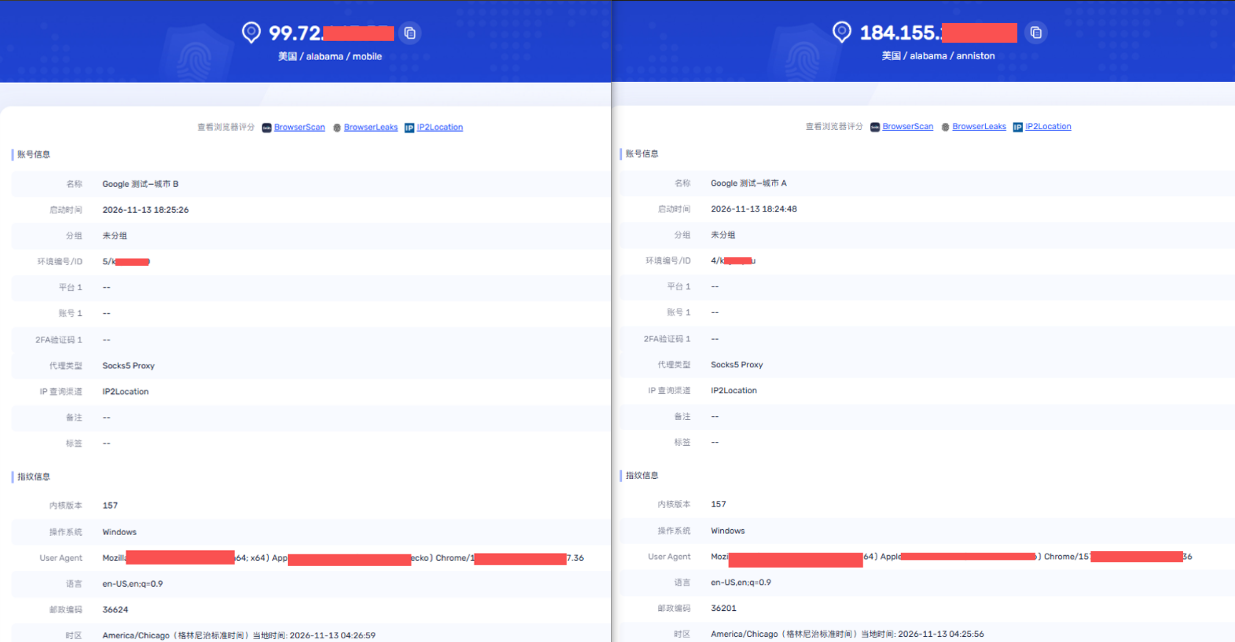
The screenshots establish the following conditions:
| Recorded field | Environment A | Environment B |
|---|---|---|
| Browser application | AdsPower | AdsPower |
| Browser core version | 157 | 157 |
| Operating system | Windows | Windows |
| Browser language | en-US,en;q=0.9 | en-US,en;q=0.9 |
| Configured timezone | America/Chicago | America/Chicago |
| Proxy protocol | SOCKS5 | SOCKS5 |
| Exit IP, partially masked | 184.155.104.* | 99.72.147.* |
| IP lookup service | IP2Location | IP2Location |
| Reported exit city | Anniston, Alabama | Mobile, Alabama |
| Google displayed location | Calhoun County, Alabama | Birmingham (Ann and Tusc), Alabama |
| Google location source | From your IP address | Based on your past activity |
The evidence did not include exact search timestamps, session-duration settings, or paired before-and-after exit checks. Browser launch times were visible, but they should not be treated as the times when the searches ran.
Environment A showed a county-level Google location. Environment B showed a location different from its IP lookup city and identified past activity as the source.
4. Recorded Organic Results
The captured pages contained nine identifiable ordinary organic results in Environment A and eight in Environment B.

| Position | Environment A | Environment B |
|---|---|---|
| 1 | Nike | Nike |
| 2 | Adidas | Adidas |
| 3 | Road Runner Sports | Road Runner Sports |
| 4 | Runner’s World | Runner’s World |
| 5 | Fleet Feet | Rykä |
| 6 | HOKA | HOKA |
| 7 | DICK’S Sporting Goods | |
| 8 | Runners Need | Fleet Feet |
| 9 | Shoe Carnival | No ninth ordinary organic result recorded |
The first four results matched, and HOKA appeared sixth in both observations. Fleet Feet appeared fifth in Environment A and eighth in Environment B.
These are positions within the recorded result sets. A website absent from one screenshot should not be described as having no ranking elsewhere.
Both pages contained an AI Overview and product cards. Those modules were recorded separately and excluded from the organic-position count.

5. What the Test Does and Does Not Show
The screenshots demonstrate differences between two search environments. They do not establish that the differences were caused by the selected cities.
Environment B did not pass the intended city-location check. Its result should remain in the record as an observation requiring review, rather than being reported as a verified Mobile ranking.
The practical lesson is to check the location source before interpreting ranking differences. A connected proxy and a plausible IP lookup result do not independently establish the location applied by the search engine.
6. How to Retest a Location Mismatch
Preserve the original record, then create a separate retest:
- Use a fresh browser environment without inherited search cookies or history.
- Keep browser version, language, device type, and account state consistent with the comparison.
- Configure the intended location and verify the current exit.
- Search again and capture Google’s location and location source.
- Record the actual search time and check the exit after collecting results.
Do not assume that a clean environment guarantees an exact city label. If Google still shows a different or broader location, preserve that wording and classify the observation at the level the evidence supports.
Once the conditions are verified, repeat both environments within a documented comparison window. Keep all valid observations, including those where the rankings are identical.
7. Use a Consistent Record for Ongoing Monitoring
| Field | What to save |
|---|---|
| Observation ID | Unique identifier for each run |
| Search time | Date, time, and timezone |
| Query | Exact keyword |
| Intended location | Selected country, state, or city |
| Proxy settings | Product and non-secret session configuration |
| Exit evidence | IP and lookup location before and after |
| Search conditions | Language, region, device, account, and browser state |
| Google location | Displayed wording and stated source |
| Results | Counted organic links and separate search modules |
| Status | Accepted, unsuccessful, or requires review |
An accepted observation should meet the conditions defined for the task. A failed page load is not a ranking loss, and a location mismatch is not a verified city comparison.
Before expanding your monitoring, apply this workflow to a small set of keywords. Use the proxy selection guide to decide whether the next test needs regional flexibility or a retained exit address.