9HTTP



 3 min read


Businesses may need to access websites through a network connection in a specific region when testing regional pages, checking ad placements, or conducting market research. A residential proxy is one way to establish this connection. 9HTTP's Dynamic Residential Proxies are an example of this type of service.
To understand residential proxies, start with two questions: which network does a request exit through, and does that exit IP need to stay the same throughout the task? The first relates to the proxy type; the second relates to session settings. They are separate considerations.
What Is a Residential Proxy?
A residential proxy is a service that forwards requests through IP addresses associated with residential networks. These IP addresses are typically assigned by internet service providers to home broadband connections. When the destination website receives a request, it sees the proxy's exit IP address.
To understand residential proxies, start by grasping two key questions: from which network exit does the request originate, and does this exit need to remain unchanged throughout the task? The former relates to the proxy type, while the latter relates to session settings; the two should not be confused.
How Does a Residential Proxy Work?
When you use a residential proxy, your application first sends its request to the proxy service. The request then reaches the destination website through a residential network connection. With 9HTTP, the process works as follows:
- Your browser or application sends a request to a 9HTTP proxy endpoint.
- The proxy service selects an available residential exit based on your settings.
- The request reaches the destination website through that exit.
- The website sends a response, which travels back to your application through the proxy connection.
A residential proxy changes the network path of a request. It does not automatically grant access permissions. Websites can still determine how to respond based on account permissions, request frequency, and other rules.
What Is the Difference Between Rotating and Sticky Sessions?
A residential proxy does not necessarily change its IP address with every request. 9HTTP's Dynamic Residential Proxies offer both rotating and sticky session options. Your choice depends on whether the task requires a consistent IP across multiple steps.
| Session Type | Exit IP Behavior | Suitable Tasks |
| Rotating session | Changes the exit IP with each request | Independent page checks that do not require the same exit IP |
| Sticky session | Can be configured to retain the same exit IP for 1–120 minutes | Authorized testing workflows that require multiple consecutive steps |
A sticky session is not the same as a long-term static IP. The exit IP may change if a residential node goes offline, network conditions change, or the session expires. Check the current session rules when configuring 9HTTP. If you need a fixed address over a longer period, consider Long Acting Static ISP.
How Do Residential Proxies Compare with Other Proxy Types?
Proxy types are primarily distinguished by the source of their exit networks. Rotation, session persistence, and exclusive IP allocation are separate configuration or resource-allocation features. Understanding these differences can help you decide whether to use 9HTTP's Dynamic Residential Proxies or another connection option.
| Proxy Type | Typical Exit Network | What to Consider |
| Residential proxy | Residential networks, such as home broadband connections | Node availability, regional coverage, and session options |
| Datacenter proxy | Datacenter or cloud server networks | Connection performance, compatibility with destination websites, and deployment requirements |
| Static ISP proxy | ISP-assigned IP addresses, typically hosted in server environments | How long the IP remains fixed, whether it is exclusive, and session persistence conditions |
| Mobile proxy | Mobile carriers' cellular networks | Network variability and whether the task requires a mobile network testing environment |
Terms such as “static residential proxy” and “static ISP proxy” may overlap across providers. When comparing products, check the actual network source and connection setup rather than judging performance or suitability by the product name alone.
What Are Common Use Cases for 9HTTP Residential Proxies?
E-commerce Data Monitoring
Collect product prices, stock availability, and promotional information across regions to support competitor tracking and pricing analysis.
SEO and Search Monitoring
Retrieve search results from target regions, track keyword rankings, and compare competitor positions and regional differences.
Ad Verification
Use residential IP addresses in target regions to check ad displays, redirect links, and landing page content.
Data Collection
Rotate residential IP addresses and use your existing collection tools to gather publicly available web content for market research and AI data preparation.
How Much Do 9HTTP Proxies Cost?
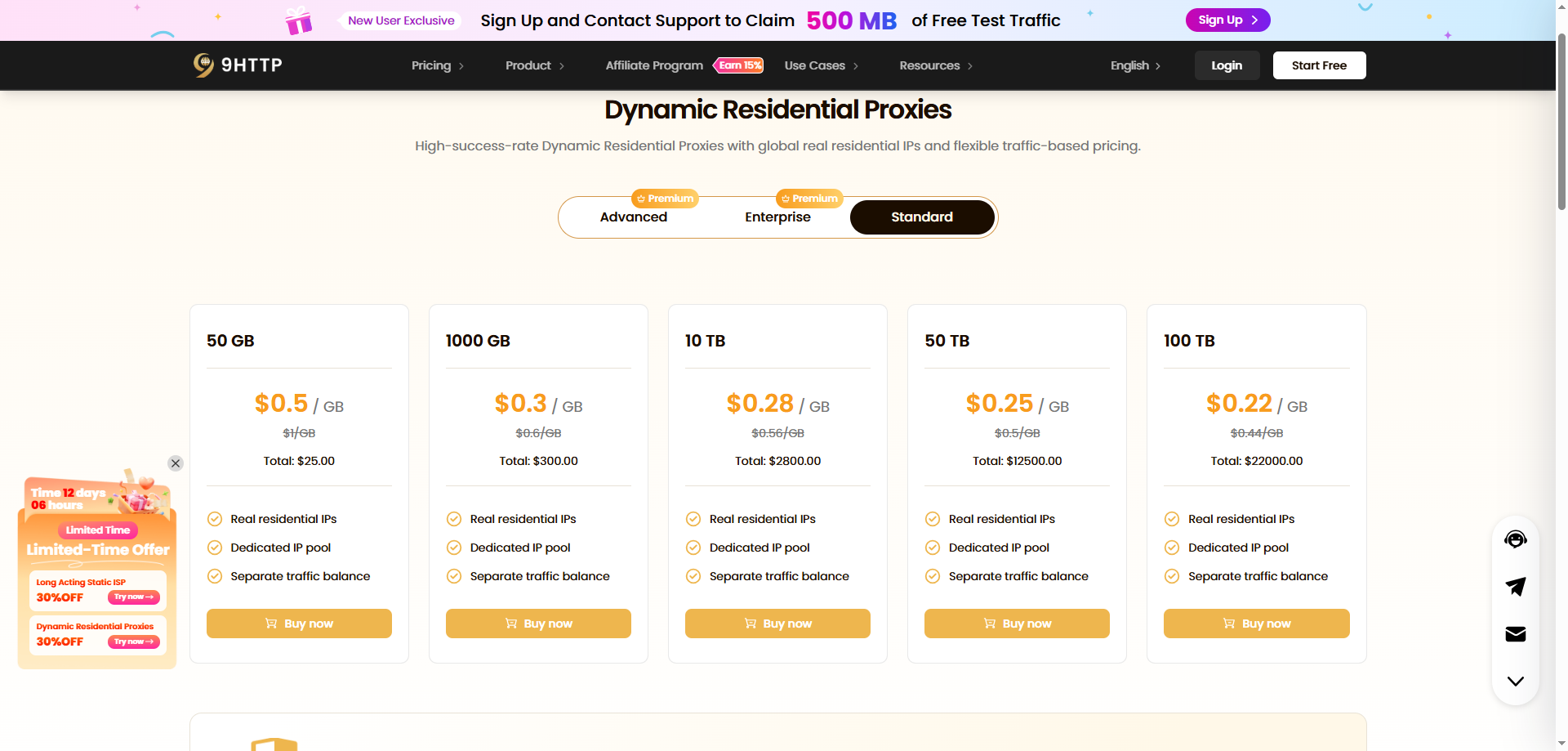
Dynamic Residential Proxies: Traffic-based billing, with plan rates starting at $0.22/GB.
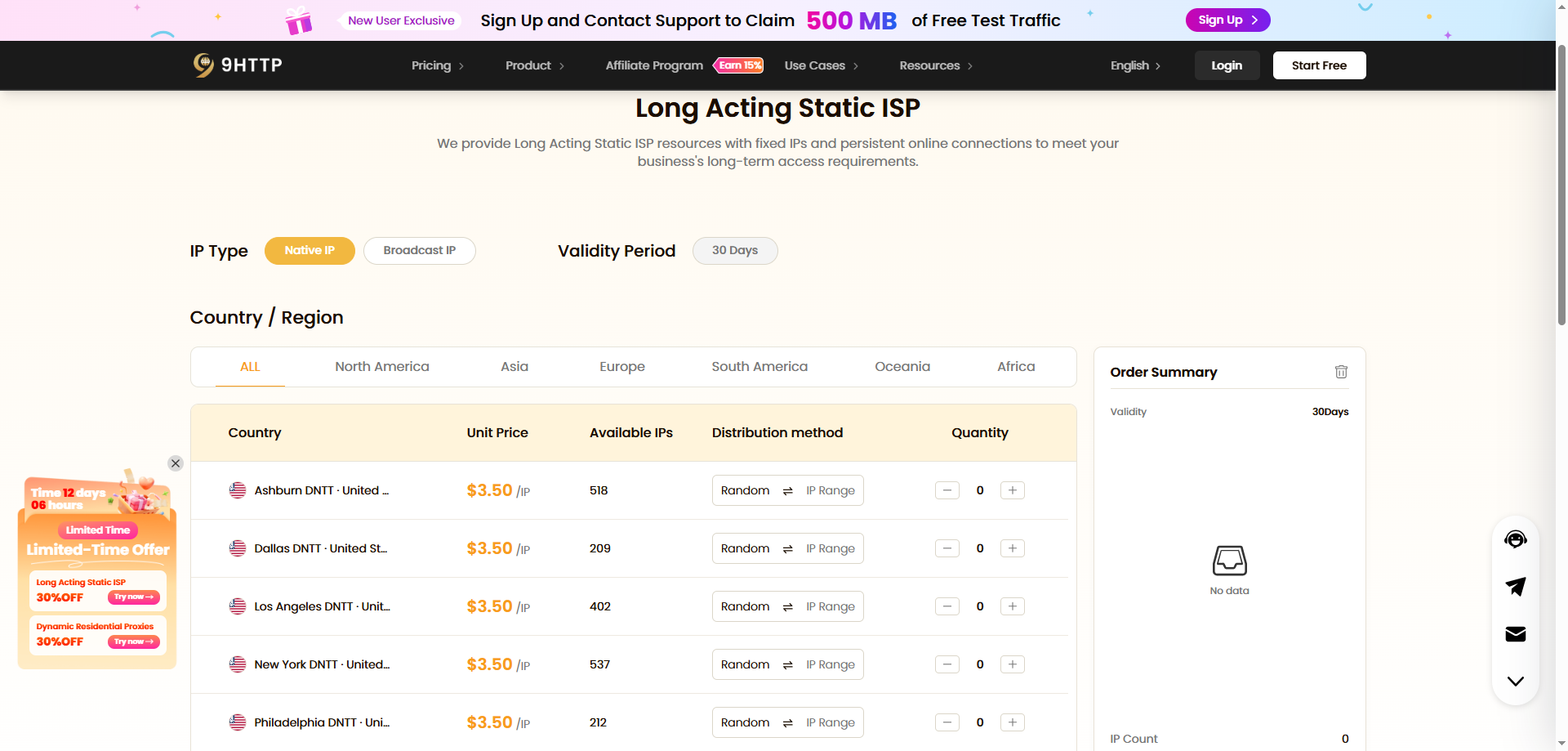
Long Acting Static ISP: Purchased per IP, with prices listed on the official website starting at $2.50 per IP.
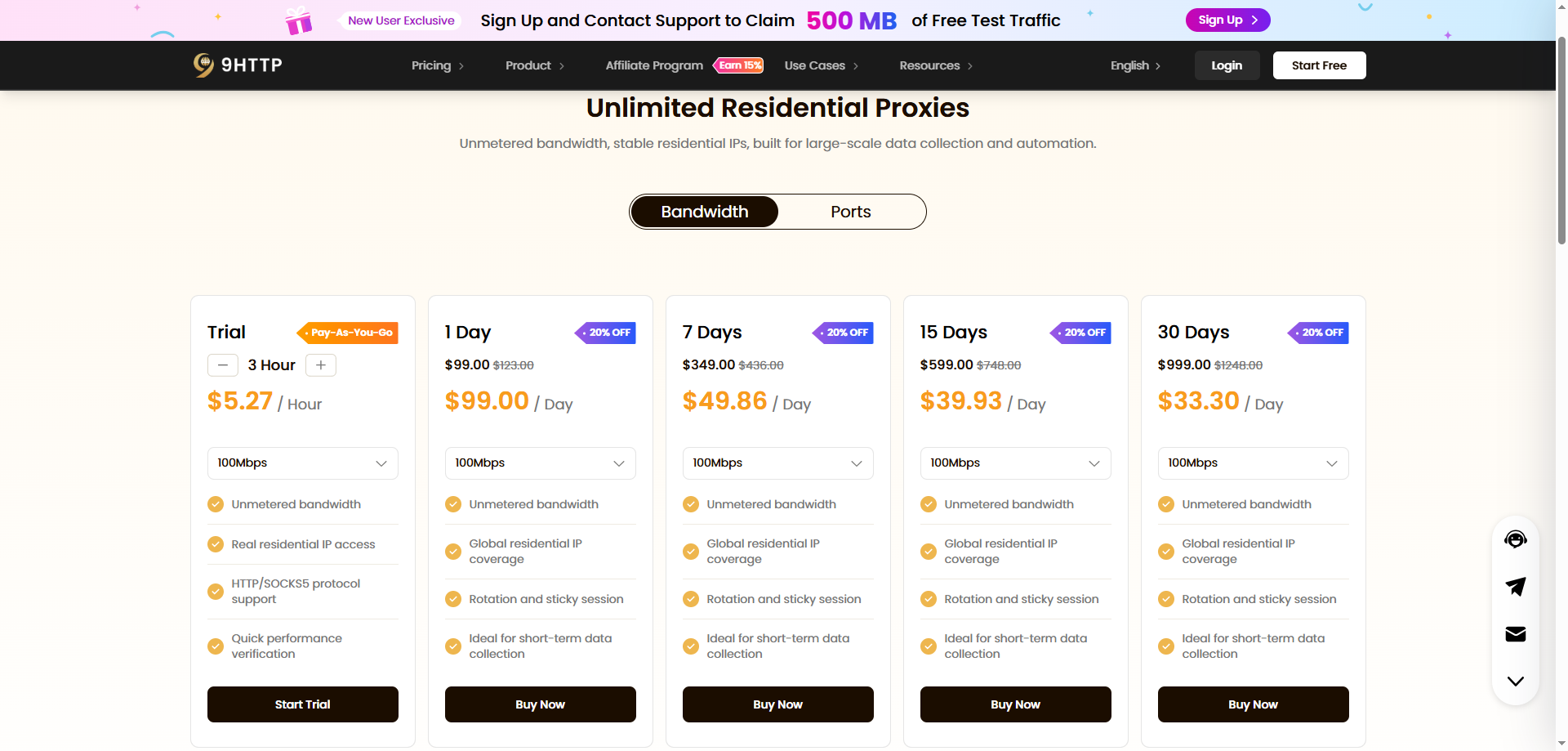
Unlimited Residential Proxies: Available in bandwidth-based and port-based plans. Bandwidth plans start at 33.30/day, while port plans start at 0.90 per port per day.
How Can You Tell Whether Residential Proxies Fit Your Task?
First, determine whether your task actually requires a residential network exit. A direct connection or another proxy type may be sufficient for routine API debugging. If you need to carry out authorized tests through residential networks in specific regions, assess whether residential proxies meet those requirements.
Before using 9HTTP, identify your target regions, whether you need session persistence, and your expected request volume. Configure the connection according to the product documentation, then run a small-scale test to assess actual performance.
For more guidance, read 9HTTP's How to Choose a Residential Proxy Provider. For setup instructions, see the official documentation.
Frequently Asked Questions
Is a Residential Proxy the Same as a Residential IP?
A residential IP is a network address. A residential proxy is a service that forwards requests through such addresses. Connecting to a proxy service such as 9HTTP also involves an endpoint, port, authentication, and session configuration, in addition to the exit IP.
Does the Exit IP Always Change When You Use a Residential Proxy?
Not necessarily. Rotating and sticky sessions handle exit IPs differently, and the specific behavior depends on the product and configuration. When using 9HTTP's Dynamic Residential Proxies, choose a session option that fits your task. A sticky session should not be treated as a permanently fixed IP address.
Can a Residential Proxy Guarantee Successful Access?
No. Access also depends on website permissions, request frequency, account status, network quality, and other factors. A residential IP alone does not guarantee that a request will succeed.
Is It Legal to Use Residential Proxies?
This depends on how the network resources are sourced, the jurisdictions involved, and the specific activity. Make sure the network resources are appropriately authorized, and follow applicable laws, privacy requirements, and the destination service's terms. Publicly visible data is not necessarily unrestricted in how it may be collected or used.